DAP - DAP Drive Integration
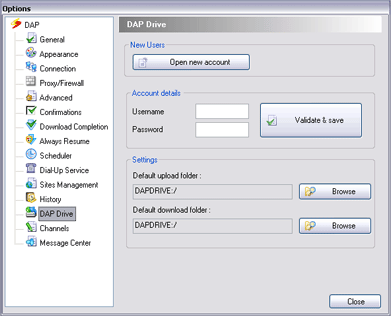
In order to use DAP Drive Integration you must have a valid DAP Drive Account (click here to learn more). Once you have registered with DAP Drive, you can use the DAP configuration wizard to Validate and Save your DAP Drive details.
- In DAP's main window, select the Tools menu and choose Options. DAP's configuration window will appear.
- Choose the DAP Drive from the configuration menu.
- Fill-in your DAP Drive account details and click on the 'Validate & Save' button.
- You can select the default upload and download directories.
- If you do not have a DAP Drive account, click on the 'Open new account' button.