Tray Icon Minimization
When you download with DAP Premium, you are powered with a additional
set of options:
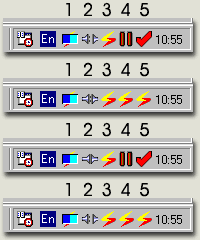
While downloading a file the download window may be minimized to the system
tray for improved PC performance (see the picture below)

 |
Read Below... |
|
- Download in progress: this is a graphical progress bar which illustrates the progression of the file download. When you move your mouse over the bar and hold it will show a tool tip with the exact percentage of the current download progression.
- When starting a download, DAP will connect to the selected servers, you will see this animated icon and it will disappear when DAP begins downloading - the icon will change and the progress bar will be shown.
- DAP's regular icon when minimized into the tray.
- When pausing a minimized download it will blink with the pause icon until you resume it. Right click on the icon an choose resume download to resume the download from the tray.
- When a download finishes it will blink with the check mark until you click on it.