
AlwaysResume

In order to activate your Always Resume package follow the instructions bellow.

  1. Click the Tools menu at the top of DAP's main window, select the Always Resume Service, and then select the Activate Always Resume option from the drop down menu.


  2. Copy your e-mail and activation code from the email, paste it into the appropriate box and click OK.
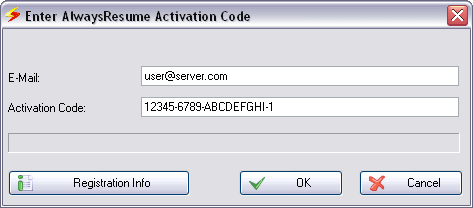
    Screenshot of DAP's 'AlwaysResume Activation Code' window

  3. When confirmed click OK, your Always Resume Package is now activated.

SPEEDbit Awards title
Download Accelerator Plus (DAP) on BrotherSoft's Top 10 Downloads in 2009
Softonic outstanding rate logo for SPEEDbit Video Accelerator
SPEEDbit's Technology Pioneer 2008 logo from World Economic Forum
Download.com 4.5 Stars logo for Download Accelerator Plus (DAP)

SPEEDbit Reviews title

Our Users Say:

DAP 'Our Users Say' quote image