Thank you for downloading DAP 10. Your downloads just got faster.
What's New in DAP 10
New features in DAP 10 make your download and video experience fast, easy and more efficient
Video Downloader
Video to MP3

DAP Link Checker
Video Preview
With DAP Premium - The fastest is even faster
DAP 10 is the new powerful version of the world's most popular download accelerator and manager- Download Accelerator Plus (DAP). In DAP 10, SPEEDbit has reinvented what a download manager should be.The new DAP 10 platform consists of the core DAP download acceleration engine, streamlined and optimized for powerful efficiency and ease of use. On top of that powerful core, DAP now carries its features as add-ons, allowing you to choose and customize your download experience.
Take advantage of DAP Premium and get even more:
- Get Extreme Acceleration
- Get Superior Features
- Get Premium Support
Fastest and Easiest
Video Downloader
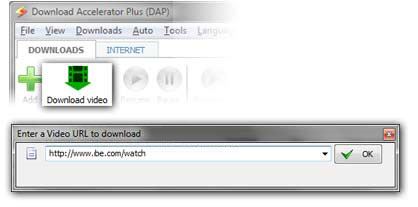
Download videos from flash video site. Click the "Download Video" button and paste the
video URL in the dialog to make DAP download the video.
Click to see a video demo
• One-Click video downloading and converting
• Supports more sites than any other Downloader
Video to MP3
Easily download videos directly as MP3 audio files and grow your iTunes music library.
Click the "Download MP3" button, or click the "Download MP3" button and paste the video URL in the dialog and DAP will download the video and convert it to MP3 (or other format of choice).
Click the "Download MP3" button, or click the "Download MP3" button and paste the video URL in the dialog and DAP will download the video and convert it to MP3 (or other format of choice).
• Download videos as MP3 music files
• Easily grow your iTunes music library
DAP Link Checker
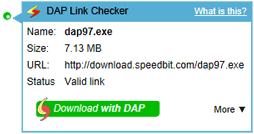
With DAP 10's unique Link Checker browser add-on you will not waste time on broken downloads, endless count-downs and distracting ads. Before you start downloading a file, DAP Link Checker will let you know if it is still online, if it was removed, or if the file has expired.
On your browser, next to any download link, you will see an icon ( ) indicating the status of the download link. Hover over the icon and get all the information about the file behind the download link, so you will know if you should start downloading.
the frustration of downloading from many
hosting sites such as hotfile.com and rapidshare.com. Click the download button
and the download will start immediately,
avoiding the need to follow page after page until you start the actual download.
On your browser, next to any download link, you will see an icon (
) indicating the status of the download link. Hover over the icon and get all the information about the file behind the download link, so you will know if you should start downloading.
the frustration of downloading from many
hosting sites such as hotfile.com and rapidshare.com. Click the download button
and the download will start immediately,
avoiding the need to follow page after page until you start the actual download.
• Don't waste time on broken downloads
• Get the file info before you download
Video Preview
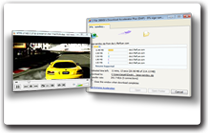
Start watching your videos instantly and save time- don’t wait for their download to finish. The Video Preview feature lets you play video and audio files instantly after they start to download. While downloading, click the Video Preview link to play the file and make sure the content you are downloading is really the content of your choice.
• Don't wait for your content to finish downloading
• Play your audio and video files as they download
Products & Services


Awards & Reviews