Always Resume:
always resume is one of DAP's new features,this function enables
you to resume downloads even from servers that does not support it,mind that
only dial-up or slow connection users can use this feature.
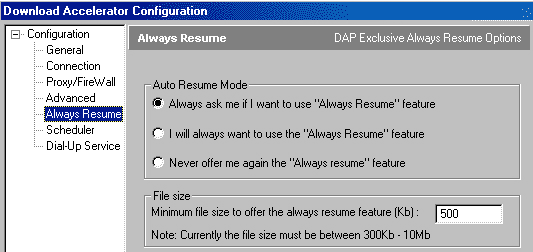
To use this option press option/configuration in the download menu,on your left
press always resume on the tree.
As you can see there are two options in the Always Resume menu:
- Auto resume mode: in auto resume mode you can choose when to use Always
Resume,if you choose always ask me... each time a file will be download from
a server that does not support resume,a pop up message will alert you and
ask you if you would like to use always resume.However, if you choose "I
will always want to use Always Resume feature" DAP will determine automatically
when a server does not support resume and will use this feature.
- File size: Because Always resume slows a little the download process small
files should be downloaded regularly even when the server does not support
resume - here you can determine the minimum file size that Always Resume will
be used.
(Notice that the default is 300KB)
|
Copyright ©1999-2000
SpeedBit. All specifications are subject to change
All trademarks are the property of their respective owners
|
