
300 million installations and counting...
DAP Help
Proxy/Firewall Parameters
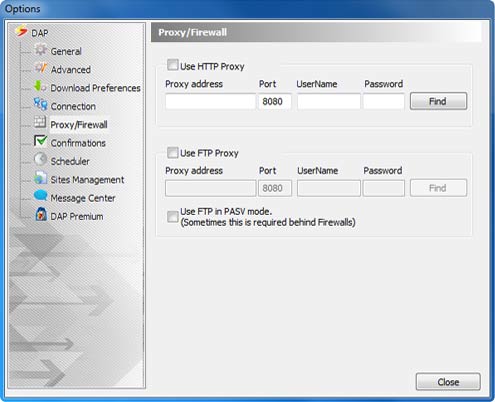
You may set DAP to use a proxy server according to your network configuration.
- In DAP's main window, select the Tools menu and choose Options. DAP's Options window appears.
- In the Options window choose Proxy/Firewall to display the Proxy/Firewall options.
- Enable the required Proxy server type options and define the settings.
To automatically copy the proxy configuration from your Internet Explorer browser, click the Find button.
If you use a firewall you may want to check the "Use FTP in PASV mode".
Products & Services

 Commercial Use Note | Copyright Infringement Notice | Speedbit Privacy Policy | Download Accelerator Plus (DAP) product License Agreement | Speedbit Distribution Agreement
Copyright © 1999-2022 Speedbit Ltd. All specifications are subject to change. All trademarks are the property of their respective owners.
Speedbit's product Download Accelerator Plus (DAP - free download manager) & services related thereto are covered by United States Patent Nos. 6,339,785, 6,377,974 and 6,606,646. Other patents pending.