
300 million installations and counting...
DAP Help
Start Downloading a File
When you click on a link to a file that you want to download, DAP's download window automatically appears and displays the Download File info.
For your convenience, you can disable this window and begin downloading the file immediately.
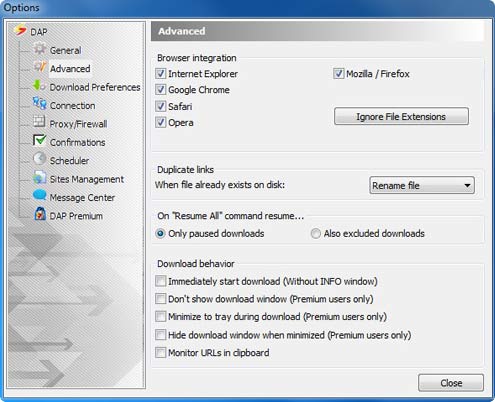
- In DAP's main window, select the Tools tab and choose Options. DAP's Options window appears.
- Choose Advanced to display the Advanced options window.
- Enable Immediately start download (Without INFO window)
- Click Close
Products & Services

 Commercial Use Note | Copyright Infringement Notice | Speedbit Privacy Policy | Download Accelerator Plus (DAP) product License Agreement | Speedbit Distribution Agreement
Copyright © 1999-2022 Speedbit Ltd. All specifications are subject to change. All trademarks are the property of their respective owners.
Speedbit's product Download Accelerator Plus (DAP - free download manager) & services related thereto are covered by United States Patent Nos. 6,339,785, 6,377,974 and 6,606,646. Other patents pending.